Payy AI assistant
A money-savvy mate, built into the app
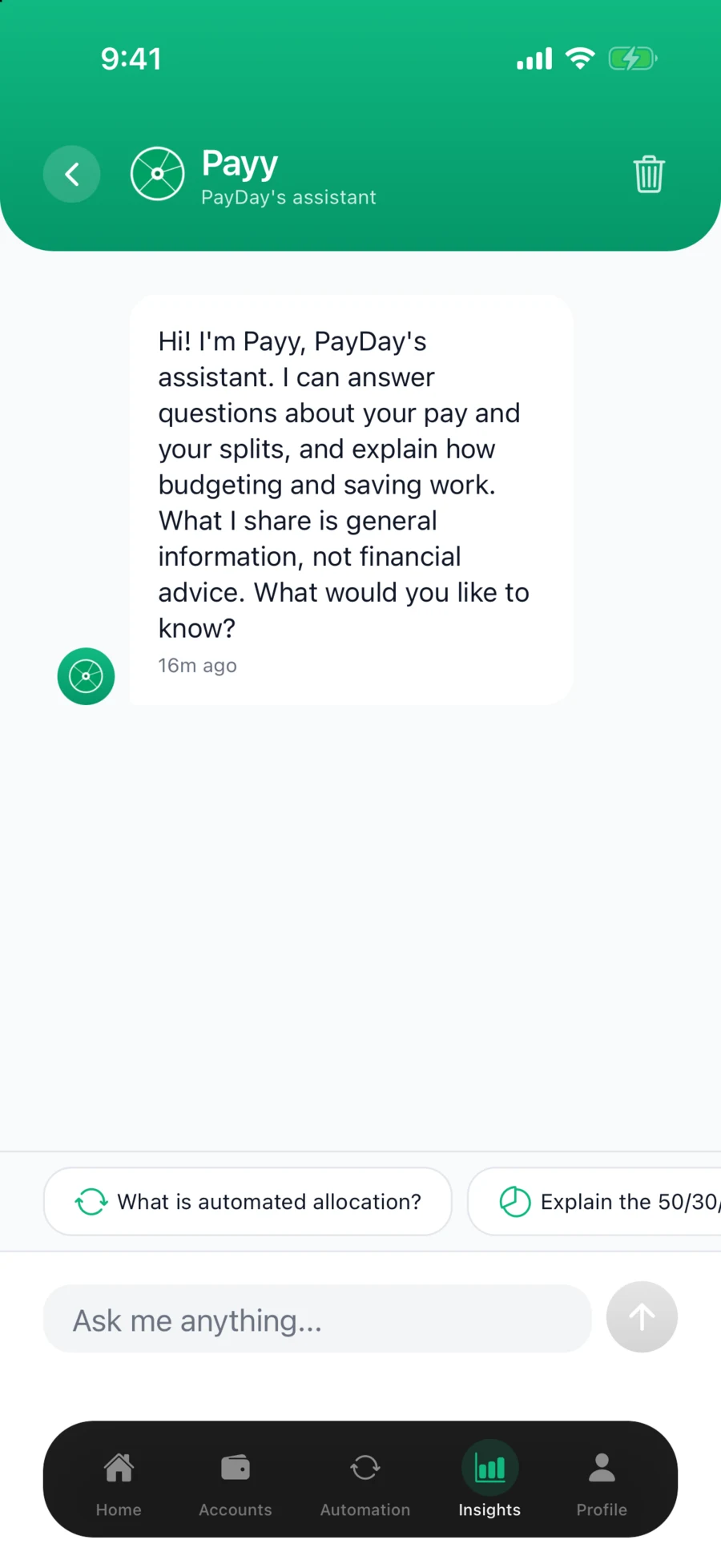
Payy answers your money questions in plain English and helps you get the most out of PayDay. No jargon, no judgement, no waiting for support.
Money questions shouldn't need a search engine
Googling gives you 40 answers
Most of them are American, half are ads, and none of them know how PayDay works.
Finance jargon is a wall
Sinking funds, offset accounts, PIR rates. Nobody teaches this stuff, and asking feels awkward.
Support queues for simple questions
"How do I change a split rule?" shouldn't mean writing an email and waiting a day.
Good setups need good ideas
Knowing you should split your pay is one thing. Knowing a sensible way to divide it is another.
Ask, learn, act
Payy is one tap away on the Insights tab, at the bottom of the Overview.
Ask in plain English
"What's a sinking fund?" "How do percentage splits work?" "What's a sensible emergency fund?" No magic words needed.
Get a straight answer
Payy explains it the way a mate would, built around New Zealand money: NZ banks, KiwiSaver, NZ terms.
Put it into action
When you're ready, your split rules are right there in the app. Learn the idea, then make it automatic.
Helpful, without being nosy
Payy is built as a knowledge assistant, not a window into your banking data.
No transaction access
Payy cannot read your transactions or account numbers. It is sent only what you type, your name, how many accounts you have, your total balance and your splits, and only once you allow it.
Education, not advice
Payy gives general information, never personalised financial advice. Big decisions deserve a licensed adviser.
Never touches your money
Payy cannot move money or change your rules. Only you can do that, in the split editor.
Built for New Zealand
Payy speaks NZ personal finance: KiwiSaver, NZ banks, and the way Kiwis actually get paid.
Payy AI questions
What is Payy AI?
Payy is the AI assistant built into the PayDay app. It answers your personal finance questions in plain English, helps you get set up, and explains how to get the most out of your split rules.
Where do I find Payy?
On the Insights tab in the PayDay app. Tap Ask Payy about budgeting and your splits, at the bottom of the Overview, and ask away. The first time, Payy asks for your permission before anything is sent.
Can I turn Payy off?
Yes. Payy is optional, and the rest of PayDay works without it. Turn it off any time in Profile, under Payy and AI. Payy then stops sending anything to Anthropic, and asks for your permission again the next time you open it.
Can Payy see my bank transactions or balances?
Payy cannot see your transactions or account numbers. So it can answer questions about your own setup, it is given your name, the total balance of the accounts you have not hidden as at the last bank sync, how many accounts you have hidden, and your active splits. Anthropic, which powers Payy, receives that with your message. Payy is not sent the figures on the Insights tab, such as Left to spend or your bills before your next pay, or the transactions behind them. Nothing is sent until you allow Payy the first time you open it. Our privacy policy has the details.
What kind of questions can I ask Payy?
Anything you would ask a money-savvy mate: how percentage splits work, what a sinking fund is, how to think about an emergency fund, how KiwiSaver fits alongside personal savings, or how to set up a split rule for a specific goal. Payy is built around New Zealand personal finance.
Is Payy free to use?
Payy is included on both PayDay plans, Plus and Pro, at no extra cost, including during your free trial. You can send Payy up to 50 messages in any 24 hours.
Does Payy give financial advice?
No. Payy provides general information and education, not personalised financial advice. It will never tell you what to invest in or make decisions for you. For advice specific to your situation, talk to a licensed financial adviser.
Meet Payy when we launch
Join the waitlist and Payy will be waiting on the Insights tab, ready for your first question. Early members get 6 months of Pro free.
Join the waitlist